_20?.png) (BANTIMES) - Ban time rules GROUP POWER
(BANTIMES) - Ban time rules GROUP POWERBantimes is a group power that allows you to set ban rules (predefined reasons and durations for bans) on your chat.
How to add ban rules to your chat
First, assign the power to your chat. Then, click the "edit" button next to the Bantimes description in your group settings.
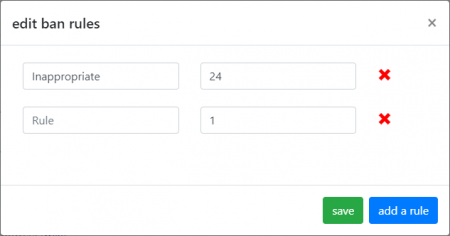
This will open the rules manager application for you to easily add, edit or remove ban rules:
- The left column is the ban reason you wish to display.
- The right column is the ban duration (integers only - no decimals).
- You can add rules by clicking the "add a rule" button or remove them using the "x" button. To edit a ban rule, simply overwrite the text within that box. Once you are finished, click "save".
How to see the ban rules on your chat
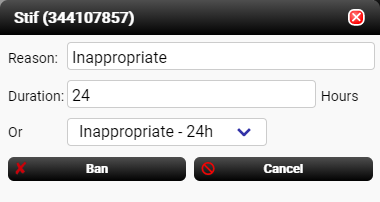
Once you've added your ban rules, go to your chat, click a user and then the "ban" button. A dropdown box will appear for you to choose which ban rule you want to use. When selecting a rule, it will automatically fill in the reason/duration fields with the values you have set.